
Showing posts with label System. Show all posts
Showing posts with label System. Show all posts
Thursday, November 3, 2011

Thursday, January 7, 2010
Dell Inspiron 1545

Dell is one of the most popular laptop brands in India. Dell has launched laptops for all price ranges. Dell laptops are suited to all users, whether you are a high powered executive, business owner, student, home or office user, dell has a laptop for you. The Dell Inspirion 1545 is a versatile and affordable midrange laptops targeted towards the budget consumer. The Dell Inspiron 1545 laptop is equipped with a budget version of the Core 2 Duo and is ideal for most multimedia and office tasks as well.
Friday, October 23, 2009
Microsoft launches Windows 7

Microsoft launched Windows 7 yesterday and that certainly is great new for India when it comes to the pricing. The prices are apparently 40% lower than the US prices.
Windows 7 Home Basic - Rs. 5,899
Windows 7 Home Premium - Rs. 6,799
Windows 7 Professional - Rs. 11,199
Windows 7 Ultimate - Rs. 11,799
Source Tech2
Monday, August 24, 2009
Nokia announces Nokia Booklet 3G - mini notebook
Nokia, today announced its mini laptop named Nokia Booklet 3G. Its powered by the efficient Intel Atom processor. The Nokia Booklet 3G delivers impressive performance with up to 12 hours of battery life. This new mini-laptop weighs 1.25 kilograms, measures slightly more than two centimeters thin. A broad range of connectivity options - including 3G/ HSPA and Wi-Fi - gives consumers high speed access to the Internet, including Nokia's broad suite of Ovi services.

The mini-laptop comes with an HDMI port for HD video out, a front facing camera for video calling, integrated Bluetooth and an easily accessible SD card reader. Other premium features include the 10-inch glass HD ready display and integrated A-GPS which, working with the Ovi Maps gadget, can pinpoint your position in seconds and open up access for a truly personal maps experience. The Nokia Booklet 3G also brings a number of other rich Ovi experiences to life, whether its access and playback of millions of tracks through the Nokia Music Store, or using Ovi Suite to sync seamlessly from your Nokia smartphone, to your mini-laptop, to the cloud.
The Nokia Booklet 3G will widen the Nokia portfolio, satisfying a need in the operator channel, and bringing another important ingredient in the move towards becoming a mobile solutions company.
Further information, including detailed specifications, market availability and pricing, will be announced at Nokia World on September 2.
For more information on Nokia World, visit :Nokia World
Sunday, July 19, 2009
Mozilla releases Firefox 3.5

Firefox 3.5 makes surfing the Web easier and more enjoyable with exciting new features and platform updates that allow Web developers to create the next generation of Web content. Native support for open video and audio, private browsing, and support for the newest Web technologies will enable richer, more interactive online experiences.
Performance. Firefox 3.5 includes the powerful new TraceMonkey JavaScript engine, which delivers unprecedented performance with today’s complex Web applications. Firefox 3.5 is more than two times faster than Firefox 3 and ten times faster than Firefox 2.
Open Video and Audio. Enjoy video and audio content from within your browser, without the need for plugins. Video is a vital part of the modern Web, whether it’s used to communicate, educate, or entertain. Firefox 3.5 delivers the first native integration of audio and video directly into the browser. Now everyone can easily watch open format Ogg Theora videos.
Web developers can use these technologies to design pages that interact with video content in new and exciting ways, offering richer interactive experiences beyond controlling playback and volume.
Privacy Controls. Firefox 3.5 includes features designed to protect your privacy online and provide greater control over your personal data.
While using the new Private Browsing mode in Firefox 3.5, nothing you encounter on the Web will be stored from that moment on during your browsing session. Unique to Firefox 3.5, the new Forget this Site feature can remove every trace of a site from your browser. If you want to remove all private data or activity from the past few hours, Clear Recent History, another Firefox-only feature, gives you full control over what stays and what goes.
Location Aware Browsing. Location Aware Browsing saves you time by allowing websites to ask you where you are located. If you choose to share your location with a website, it can use that information to find nearby points of interest and return additional, useful data like maps of your area. It’s all optional – Firefox doesn’t share your location without your permission.
Download
Mozilla Firefox 3.5 is available now for Windows, Linux, and Mac OS X operating systems as a free download from http://www.getfirefox.com. It is also available in more than 70 languages at: http://www.mozilla.com/en-US/firefox/all.html.
Thursday, September 25, 2008
3D DESKTOP FOR XP AND VISTA

Just hold Ctrl+Shift(default keys) and press left or right.You can use mouse instead of keyboard(use can change the keys by goin to settings dialog).
DOWNLOAD
Password:
wrestle-zone.net
Create an execution file to shutdown ur pc
*Right click on your desktop.
*Go to new and click shortcut and a pop up appears.
*Type Shutdown -s -t 1000 -c "anythinghere" and click next.
*Name it something.
SOURCE
*Go to new and click shortcut and a pop up appears.
*Type Shutdown -s -t 1000 -c "anythinghere" and click next.
*Name it something.
SOURCE
Thursday, May 29, 2008
USB Warmer and Chiller

USB is always used for data transfer (pen drive, mobile phones etc). But here is the device used to chill or warm anything by just connecting it to usb port. This device when connected to usb and switched on, cools or keeps warm anything you want. Now you can work as long as you can while your drink never loses its cooling. USB devices are more, like USB torch light, USB massager, USB buzzer, USB LED etc.
Thursday, February 14, 2008
SLAX - LINUX OS

Slax is a modern, small and fast Linux operating system with a modular approach and outstanding design. Despite its small size, Slax provides a wide collection of pre-installed software for daily use, including a well organized graphical user interface and useful recovery tools for system administrators.
SLAX site
Tuesday, February 5, 2008
Thursday, January 31, 2008
EXPERIENCE NEW UBUNTU 7.10
Hello ppl...UBUNTU Linux recently released its newer version UBUNTU 7.10. The new ubuntu 7.10 has many effects and many features.
You can see it in the below video.
REQUEST A FREE UBUNTU CD HERE
You can see it in the below video.
REQUEST A FREE UBUNTU CD HERE
Thursday, January 24, 2008
SYSTEM MAGICS
Hello friends. I found a cool interesting article in the name 'Computer Magics' in a site (LINK)
1st:
I am sure that you will not be able to create a folder named 'CON'. I tried this in my system and it was not done.
This is something pretty cool…and unbelievable. ..
TRY IT NOW ,IT WILL NOT CREATE ” CON ” FOLDER
2nd:
1.) Open an empty notepad file
2.) Type “Bush hid the facts” (without the quotes)
3.) Save it as whatever you want.
4.) Close it, and re-open it.
confused?
3rd:
At Microsoft the whole Team,
including Bill Gates, couldn’t answer why this
happened! It was discovered by a Brazilian. Try it out
yourself…
Open Microsoft Word and type
=rand (200, 99)
And then press ENTER.
SOURCE
1st:
I am sure that you will not be able to create a folder named 'CON'. I tried this in my system and it was not done.
This is something pretty cool…and unbelievable. ..
TRY IT NOW ,IT WILL NOT CREATE ” CON ” FOLDER
2nd:
1.) Open an empty notepad file
2.) Type “Bush hid the facts” (without the quotes)
3.) Save it as whatever you want.
4.) Close it, and re-open it.
confused?
3rd:
At Microsoft the whole Team,
including Bill Gates, couldn’t answer why this
happened! It was discovered by a Brazilian. Try it out
yourself…
Open Microsoft Word and type
=rand (200, 99)
And then press ENTER.
SOURCE
Tuesday, January 22, 2008

Thursday, January 17, 2008
World's slimmest Laptop: MacBook Air

FEATURES:
The brilliance of multi-touch.
A smart LED display.
Best battery performance
Wireless technology(Remote Disc)
DETAILS
Thursday, December 20, 2007
Tactile 3D
Tactile is an 3d explorer. Download it from the link that i have given below and launch the application. It shows you the window in which you can find the contents of 'My Computer'.You can enter into the drive and folders as u do normally. Use mouse to navigate through the space.
Screenshot:

DOWNLOAD
Screenshot:

DOWNLOAD
Saturday, December 1, 2007
Use ur keyboard as mouse
On your Keyboard Press the following Keys at the same time:
Left SHIFT + ALT + NUM LOCK
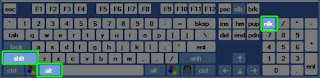 Then you will get a window like this:
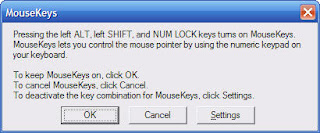
Click ok, the Mousekeys will. Once the Mousekeys is running simply use the arrow keys located on your numeric keypad (8 is up, 2 is down, 4 is left, and 6 is right).
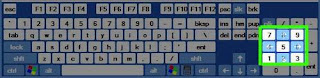
To move the cursor simply tap on the arrows in the numeric keypad (if you hold down one of the arrows, it will move the cursor faster).
You will probably notice that the cursor moves incredibly slow, so one other thing I do is, when I open Mousekeys, I go into the Settings and adjust the speed all the way up.
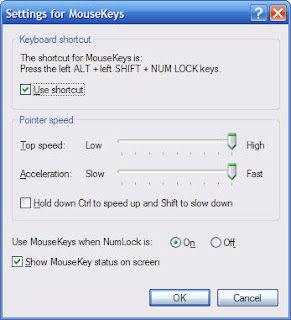
Here is what you need to know to navigate with Mousekeys:
* To move up, tap or hold down the 8 key on your numeric keypad
* To move down, tap or hold down the 2 key on your numeric keypad
* To move right, tap or hold down the 6 key on your numeric keypad
* To move left, tap or hold down the 4 key on your numeric keypad
* To Click on something, Hit the 5 key on your numeric keypad
Left SHIFT + ALT + NUM LOCK
 Then you will get a window like this:
Click ok, the Mousekeys will. Once the Mousekeys is running simply use the arrow keys located on your numeric keypad (8 is up, 2 is down, 4 is left, and 6 is right).

To move the cursor simply tap on the arrows in the numeric keypad (if you hold down one of the arrows, it will move the cursor faster).
You will probably notice that the cursor moves incredibly slow, so one other thing I do is, when I open Mousekeys, I go into the Settings and adjust the speed all the way up.

Here is what you need to know to navigate with Mousekeys:
* To move up, tap or hold down the 8 key on your numeric keypad
* To move down, tap or hold down the 2 key on your numeric keypad
* To move right, tap or hold down the 6 key on your numeric keypad
* To move left, tap or hold down the 4 key on your numeric keypad
* To Click on something, Hit the 5 key on your numeric keypad
Monday, November 26, 2007
Ionic cooling in the future

Cooling your computer using a water-based solution is not the best way to do it anymore. A new technology of cooling has appeared. It will increase the cooling abilities of usual fans very much. As computers' powers grow more and more heat is generated by its chips and we need gadgets to deal with that heat. The scientists believe that wind engines that create a "breeze" of charged particles (ions) will be able to keep the chips cool.
After the research the scientists have discovered that airflow cooling fans are not very effective because of the problems in air flow. Even when the fan blows the air to a chip, the nearest molecules to the chip tend to stay at the surface of it, which makes cooling effect much smaller.
The new technology created by the scientists is going a different way by shifting the charged particles from one end of the chip to the other. The experimental wind engine charges up particles and sends them over the chip, they are being attracted to negatively charged wires and this will make the molecules of air to constantly move improving cooling abilities. With introduction of ions in cooling technology there will be no need for water cooled solutions.
Professor Suresh Garimella gave the numbers about the improvement of the cooling abilities on computer chips. Their new gadget will improve cooling powers by 250% which basically means a 2.5 times increase in cooling. I wish I had something like that because my cooler sometimes goes to a 5 thousand RPM and gets really loud. By the way any other enhancements that you can do to your computer will increase cooling power by 40-50% (1.4-1.5 times). Just so you can compare how effective the new technology will be.
The last thing research team needs to do is to shrink their device to the size that can be used in the computers. That means that they have to shrink it a hundred times, and that will be a very big challenge for them. As for the rest of the device it is fully functional and we will have to wait another three years or so until hits the market.
SPEEEED Up ur Firefox browser
1. Enter the Configuration panel of firefox by "about:config" in address-bar .
2. Search and Set
browser.cache.disk.capacity to 3/4 th of existing value.
3.Search and set
browser.cache.memory.capacity to 3/4 th of existing value.
4. Restart you firefox. and you will have enough speed from your system to play with firefox.
HOW IT WORKS?
Actually browser.cache.memory.capacity and browser.cache.Disk.capacity are the parameters that specify number of memory should be given to the Firefox While Execution. So setting it to lower value reduces load on the RAM and you work faster with your lovely Browser.
2. Search and Set
browser.cache.disk.capacity to 3/4 th of existing value.
3.Search and set
browser.cache.memory.capacity to 3/4 th of existing value.
4. Restart you firefox. and you will have enough speed from your system to play with firefox.
HOW IT WORKS?
Actually browser.cache.memory.capacity and browser.cache.Disk.capacity are the parameters that specify number of memory should be given to the Firefox While Execution. So setting it to lower value reduces load on the RAM and you work faster with your lovely Browser.
Thursday, November 15, 2007
Access your PC from mobile phone
Snoor is a web service that uses your mobile browser to extend phone’s capabilities in may ways, not the least of which is making cheap International calls using Skype and accessing your PC’s files and Outlook.
SoonR uses the features that are already built into your phone. It is the only service that enables standard mobile phones to use the applications on PCs in an optimized way. Desktop Search, Outlook, Skype, and the files on desktop computer are made available anywhere you are and even when your computer is turned off. Any phone with data access/plan becomes a smart phone and acts as a remote control for your computer.

How it works?
Using your normal wireless service, access is made possible with no software installed on your phone.
The service authenticates and stores meta-data about all shared resources. It also tracks your groups and renders views based on your phone characteristics.
A small client securely links your PC applications and data to the SoonR service and reports changes to the computers’ status.
In order to access your computer from your phone, you need to sign up a free service and download a SoonR Desktop Agent that runs on your computer, and define which folders you want to access from your phone. This program allows you to leverage applications installed on your computer such as Outlook, Skype, or Desktop search. Its not over yet ! It will optimize all the data that is sent to your phone, leveraging the superior power of your computer CPU.
SoonR basic accounts are free. Users can access photos, files, and documents and even share them with others. Premium accounts such as a feature that allows SoonR to work even if your PC is powered down and will cache the data you want to be able to access will be launch in future.
SoonR uses the features that are already built into your phone. It is the only service that enables standard mobile phones to use the applications on PCs in an optimized way. Desktop Search, Outlook, Skype, and the files on desktop computer are made available anywhere you are and even when your computer is turned off. Any phone with data access/plan becomes a smart phone and acts as a remote control for your computer.

How it works?
Using your normal wireless service, access is made possible with no software installed on your phone.
The service authenticates and stores meta-data about all shared resources. It also tracks your groups and renders views based on your phone characteristics.
A small client securely links your PC applications and data to the SoonR service and reports changes to the computers’ status.
In order to access your computer from your phone, you need to sign up a free service and download a SoonR Desktop Agent that runs on your computer, and define which folders you want to access from your phone. This program allows you to leverage applications installed on your computer such as Outlook, Skype, or Desktop search. Its not over yet ! It will optimize all the data that is sent to your phone, leveraging the superior power of your computer CPU.
SoonR basic accounts are free. Users can access photos, files, and documents and even share them with others. Premium accounts such as a feature that allows SoonR to work even if your PC is powered down and will cache the data you want to be able to access will be launch in future.
Thursday, November 8, 2007
Various Tools to Download and save Youtube Videos
GooTube FLV retriever
You just enter the video page URL on the Webpage and download the youtube video. Thats easy huh!
VideoDL
It is a quick AJAX application that allows you to download online video into your computer. At present it supports top 3 video sites - YouTube, Google Video, and Break.com.
YouTubeX
This one allows you to save and download YouTube videos easily with the help of or directly from your browser, either Firefox or Internet Explorer.
KeepVid
You can download videos frm different site(AROUND 60 SITES). You just paste the video link n u ll get a download link.
NOTE: The downloaded file will hav a default name "get_video". You should rename the file extension as ".flv". You need flv player for playing the files.
Download FLV Player
You just enter the video page URL on the Webpage and download the youtube video. Thats easy huh!
VideoDL
It is a quick AJAX application that allows you to download online video into your computer. At present it supports top 3 video sites - YouTube, Google Video, and Break.com.
YouTubeX
This one allows you to save and download YouTube videos easily with the help of or directly from your browser, either Firefox or Internet Explorer.
KeepVid
You can download videos frm different site(AROUND 60 SITES). You just paste the video link n u ll get a download link.
NOTE: The downloaded file will hav a default name "get_video". You should rename the file extension as ".flv". You need flv player for playing the files.
Download FLV Player
Subscribe to:
Posts (Atom)